For Tuition Centres & Trainers: Create Custom Study Guides & Podcasts in Minutes

- 5 February 2026
- Technology
Key Takeaways
- NotebookLM turns static PDFs and KSSM/IGCSE textbooks into interactive study buddies instantly.
- Audio Overviews allow you to generate “Revision Podcasts” that students can listen to during traffic jams.
- AI Quizzes save hours of prep time by automatically generating practice questions from your specific notes.
- Essay Analysis helps teachers spot common grammar mistakes across 50 papers in seconds, not hours.
- Differentiation is key; offering AI tools justifies your fees and attracts tech-savvy parents.
Can AI Replace the “Cikgu” or Just Give Them Superpowers?
NotebookLM is not here to replace teachers; it is a “Corporate Brain” that turns your syllabus into an always-available tutor.
Parents in Malaysia don’t just pay for tuition; they pay for results and convenience. If your centre sends students home with a custom “Podcast Revision” of today’s History lesson to listen to in the car, you aren’t just a tutor—you are an innovator. This guide shows tuition centres, music academies, and corporate trainers how to use Google’s NotebookLM to automate prep work and offer premium value.
Feature | Old Way (Manual Prep) | New Way (NotebookLM) |
Study Guides | Hours summarizing textbooks | Instant summary & “Cheat Sheets” |
Quizzes | Typing out questions manually | Auto-generated from uploaded PDF |
Revision | Students re-reading notes | “Audio Overview” Podcast |
Grading | Marking papers one by one | Bulk analysis of common errors |
Cost | Expensive (Time & Staff) | Free (Google Account) |
Read More: Simplify the Fine Print: How Malaysian Agents Can Use AI to Win Client Trust
How Do I Turn Textbooks Into Instant Practice Quizzes?
Stop wasting weekends typing out MCQ questions—let AI generate them from your syllabus.
Tuition teachers often spend countless hours creating fresh practice questions for students. With NotebookLM, you can upload your specific teaching materials (PDFs of textbooks, past year questions, or your own notes) and ask the AI to generate quizzes that test understanding, not just memorization.
Real-World Use Case:
Imagine you are teaching Sejarah Form 5. You upload Chapter 2 notes into NotebookLM. Instead of manually writing questions, you type: “Create 10 Multiple Choice Questions based on this chapter, focusing on the factors of nationalism. Include the answer key and explanations for why the wrong answers are incorrect.”
Steps to Execute:
- Create a Notebook: Name it “SPM Sejarah Form 5”.
- Add Sources:Upload your PDF notes or paste text from the textbook or paste a YouTube link from other teachers.
- Prompt the AI: Use the command “Generate a Study Guide” or type specific quiz prompts.

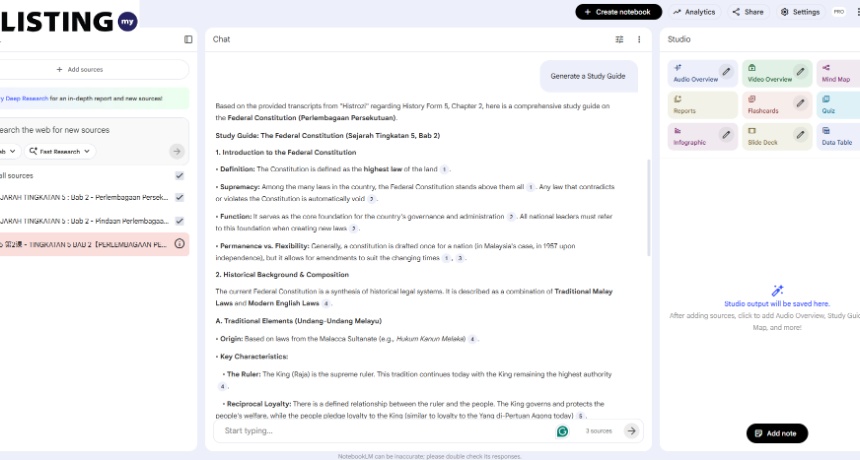
Pro Tip: For IGCSE Science, ask the AI to “Create a glossary of key terms defined in these notes.”
Can I Really Create a ‘Revision Podcast’ for Students?
The “Audio Overview” feature is your secret weapon for students stuck in Malaysian traffic.
One of the biggest complaints from students is that they “don’t have time to read.” However, they always have their earphones in. NotebookLM’s Audio Overview feature takes your uploaded text documents and converts them into an engaging, banter-style conversation between two AI hosts. They discuss the material, make analogies, and summarize key points.
Why This Wins Parents Over:
Tell parents: “Your child can revise for their Biology test while you drive them to school.” You can share the audio file directly with your students via WhatsApp or Telegram.
How to Generate:
- Upload your lesson notes for the week.
- Click on “Notebook Guide” > “Audio Overview”.
- Click “Generate”.
- Download the audio file and brand it as your centre’s exclusive “Weekly Recap Podcast.”
How to Automate Essay Feedback Without Losing Quality?
Grade smarter by identifying class-wide weaknesses in seconds.
Marking 30 English essays is exhausting. While you should still give personal grades, NotebookLM can act as a “pre-marker” to spot patterns. By uploading a batch of anonymous student essays (or a representative sample), you can ask the AI to identify common grammatical errors or weak arguments across the group.
The “Grading Assistant” Workflow:
- Upload: Upload 5–10 student essays (ensure names are removed for privacy) and your grading rubric.
- Prompt: “Based on the attached grading rubric, analyze these essays. What are the top 3 common mistakes students are making in their thesis statements? Give me examples.”
- Result: You get a report saying, “60% of students failed to link the evidence to the topic sentence.” Now, you know exactly what to reteach in the next class.
Note: Always verify AI feedback. Use it to find trends, not to assign the final grade on a report card.
Still Unsure How to Modernize Your Academy?
If you are spending more time on admin and prep than on actual teaching, you are letting your competitors win. NotebookLM is free, secure, and available right now.
Implementing these tools doesn’t just save time; it positions your brand as a “Premium Tech-Enabled Academy.” Parents are looking for the best.
Running a top-tier academy? Make sure parents can find your center on Malaysia’s most trusted Business Directory at Listing.my.