How to Secure Your Office WiFi: Stop Your Neighbors from Spying on You
TL;DR
- The Main Mistake: Letting visitors and employees use the same WiFi password.
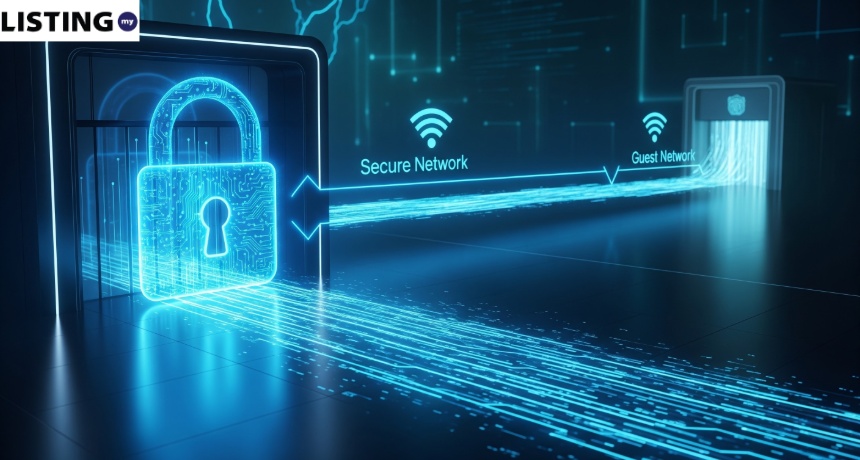
- The Guest Network: Always set up a separate network for guests that cannot “talk” to your server or office computers.
- Hide the SSID: Stop broadcasting your WiFi name so hackers don’t see your office as a target.
- WPA3: If your router is newer than 2022, ensure you are using WPA3 encryption, not the old WPA2.
Introduction: Your Office WiFi is Your Front Door
In 2026, most Malaysian SMEs have moved to a wireless-first office. But while WiFi is convenient, it is also the easiest way for a hacker to “break in” without physically entering your building.
According to a 2025 report by CyberSecurity Malaysia, 43% of data breaches in Malaysian SMEs originated from unsecured wireless networks. The average cost of a data breach for a small business in Malaysia has reached RM3.5 million when factoring in fines, remediation, and reputational damage under the PDPA Amendments 2025.
Whether you’re in a high-rise in KL or a shop-lot in Ipoh, your WiFi signal bleeds through walls and into the street. A standard office router can broadcast a usable signal up to 50 meters—meaning anyone in the building next door or parked in your lot can potentially see your network. If your security is weak, anyone from a competitor to a casual hacker can sit in their car downstairs and intercept your company’s data.
This guide provides a simple, non-technical checklist to secure your office WiFi and protect your PDPA compliance.
Also Read: PDPA Audit Checklist for Malaysian Websites & Apps
1. The Number One Rule: Separate Your Guests
The most common security breach in Malaysian offices happens when a visitor (a contractor, a delivery person, or even a friend) asks for the WiFi password. You give them the “Main” password, and suddenly, their phone—which might be infected with malware—is on the same network as your server.
What is a Guest Network?
A guest network is a separate WiFi connection that allows visitors to access the internet without gaining access to your internal devices, servers, or shared folders. It creates an isolated “lane” that keeps guest traffic separate from your business traffic.
The Solution: A Guest Network
Most modern routers (like the ones from TM Unifi or Time) have a “Guest Network” feature.
- Isolated Access: A guest network allows users to browse the internet but prevents them from seeing other devices on the network.
- Separate Password: Change the guest password every month.
- Bandwidth Limiting: Many routers let you cap the guest network’s speed (e.g., 20Mbps) so visitors don’t slow down your office operations.
- VLANs for the Pro-Office: If you have more than 20 staff, ask your [MSP] to set up VLANs (Virtual Local Area Networks) to further separate your HR data from your Sales data.
WPA2 vs. WPA3 vs. WPA3-Enterprise: Which Should You Use?
| Feature | WPA2 | WPA3-Personal | WPA3-Enterprise |
| Released | 2004 | 2018 | 2018 |
| Encryption | AES-128 | AES-192/256 | AES-256 |
| Brute Force Protection | Weak | Strong (SAE) | Strong (SAE) |
| Offline Attack Resistance | Low | High | High |
| Best For | Legacy devices | Small offices (<20 staff) | Large offices, compliance |
| Router Cost (Malaysia) | RM100–RM300 | RM300–RM800 | RM800–RM3,000 |
Recommendation: For most Malaysian SMEs, WPA3-Personal is the sweet spot. If you handle sensitive financial or healthcare data, consider WPA3-Enterprise with 802.1X authentication.
2. Hide Your SSID (Network Name)
SSID (Service Set Identifier) is the technical name for your WiFi network name—the one that appears when you search for available networks on your phone or laptop.
By default, your WiFi name is something like “TM_UNIFI_A123” or “Company_Name_Office.” This tells everyone exactly where you are and what router you are using.
How to Hide It:
Go to your router settings (usually at 192.168.0.1 or 192.168.1.1) and look for the option to “Hide SSID” or “Disable SSID Broadcast.”
- The Result: Your WiFi name will no longer appear on people’s phones when they search for a network.
- How to Connect: Your staff will have to manually type the network name and password once. It’s a 30-second inconvenience that significantly reduces your risk of being targeted by “casual” hackers.
Important Note: Hiding your SSID is not a substitute for strong encryption. Determined hackers can still discover hidden networks using packet sniffing tools. Think of it as locking your front door and drawing the curtains—both measures together provide better security.
3. Upgrade to WPA3 Encryption
Encryption is the “scrambling” that keeps your data private while it travels through the air.
- WPA2: The standard since 2004. It is now vulnerable to many hacking tools, including the well-known “KRACK” attack.
- WPA3: The new standard released in 2018/2020. It uses Simultaneous Authentication of Equals (SAE), which makes offline password-guessing attacks significantly harder.
If you haven’t upgraded your router since 2020, you are likely using WPA2. Contact your ISP or IT provider to upgrade your hardware to a WPA3-capable router.
4. Disable “WPS” (The Hacker’s Best Friend)
WPS (WiFi Protected Setup) is that little button on the back of your router that allows devices to connect with a PIN instead of a password.
The Risk: Most WPS PINs can be cracked by a basic laptop script in under 10 minutes. Tools like “Reaver” and “Bully” can brute-force the 8-digit WPS PIN in hours, giving the attacker full access to your WiFi password.
The Fix: Log into your router settings and Disable WPS. It is a major security loophole that is rarely used but often exploited.
5. Real-World Scenario: Australian Airport & Airline Hacks
This is one example of an Evil Twin attack playing out in the real world. In late 2025, a 44-year-old man was sentenced to over seven years in prison by the Australian Federal Police (AFP) for running a massive Evil Twin operation.
What happened: He used a portable device called a “Wi-Fi Pineapple” to clone legitimate public Wi-Fi networks at major airports (Perth, Melbourne, Adelaide) and even on domestic flights.
The impact: When travelers’ devices automatically connected to his stronger, fake signal, they were directed to a fake login page. He captured their emails and social media credentials, which he then used to access private accounts and steal intimate photos and data.
- Read More: WA man jailed for stealing intimate material and using ‘evil twin’ WiFi networks
How it could have been prevented:
- A hidden SSID would have made it harder to clone the network name
- WPA3 encryption would have prevented the fake hotspot from authenticating devices
- A guest network would have isolated members from the internal business systems
Conclusion: Don’t Let Your WiFi Be Your Weak Link
Your office WiFi is the digital front door to your business. In 2026, leaving it unsecured is like leaving your office unlocked overnight. By implementing a guest network, hiding your SSID, upgrading to WPA3, and disabling WPS, you create multiple layers of defense that make your business a much harder target.
The best part? These changes cost nothing but 15 minutes of your time.
FAQ: Office WiFi Security in Malaysia
Q1: Is the default Unifi router secure enough?
A: For a 5-person office, it’s okay if you change the password and disable WPS. For a larger office, we recommend a “Business Grade” router from brands like Ubiquiti, Mikrotik, or Cisco. These offer better firewall rules, VLAN support, and centralized management.
Q2: How often should I change the office WiFi password?
A: At least every 6 months, or immediately after an employee leaves the company (see our [Ex-Employee Data Theft Guide]). For guest networks, change the password monthly.
Q3: Can someone steal my data if they are just “sitting in their car” outside?
A: Yes. Using a technique called “Sniffing,” a hacker can capture the packets of data flying through the air and try to decrypt them later. Strong encryption (WPA3) stops this by making the captured data useless without the decryption key.
Q4: What is a VLAN and do I need one?
A: A VLAN (Virtual Local Area Network) is a way to split one physical network into multiple logical networks. For example, your HR department’s computers can be on a separate VLAN from your guest WiFi. If you have more than 20 employees or handle sensitive data, VLANs are strongly recommended.
Q5: Can my neighbor hack my office WiFi?
A: If you’re using WPA2 with a weak password (e.g., “company123”), yes. A determined attacker with freely available tools can crack a weak WPA2 password in hours. Switching to WPA3 and using a strong, random password (16+ characters) makes this virtually impossible.